Kubernetes secrets management: from Sealed Secrets to Vault and External Secrets
A Secret in Kubernetes is a base64 object — not encryption. The article orders the available options, from the simplest to the most complex, and shows where each one breaks in a production environment.
- base64 is not encryption: anyone with read permission in the namespace sees the secret.
- etcd encryption with a KMS provider is a minimum, not a solution — read permissions stay broad.
- External Secrets Operator separates the source of truth (Vault/cloud) from the object in the cluster.
- Secret rotation is the real test: without an automated process, the secret stays forever.
A Secret is not a secret
I open every Kubernetes cluster review with one question: what happens once someone gains access to a single namespace. In most of the clusters I have seen the answer comes quickly — every secret in that namespace, in one read, with nothing unusual in the audit log. The reason is not a fault but the design: a Secret object is somewhere the API server stores a string, not somewhere it protects one.
Structurally, Secret is an API object like any other: metadata, type and data. The data field is a map of key to value, with the value encoded in base64 — an encoding of bytes, not encryption. echo 'ZjNycnktc3Ryb25nLXBhc3N3b3Jk' | base64 -d returns the original password, with no key, no HSM and no special permission. The type field affects validation only: kubernetes.io/tls requires tls.crt and tls.key, and kubernetes.io/dockerconfigjson requires a key named .dockerconfigjson. It adds no protection, and certainly no isolation.
This is how it looks in practice, with two values that can be decoded in one line:
apiVersion: v1
kind: Secret
metadata:
  name: payments-db
  namespace: payments
type: Opaque
data:
  username: cGF5bWVudHMtc3Zj
  password: ZjNycnktc3Ryb25nLXBhc3N3b3Jk
You can also write the values in stringData and then read them as they are, but the picture does not change: what goes into etcd is the same information, and what comes out of it is the same information. Anyone with get permission on secrets in the payments namespace sees the production database password, and that is the starting point of every discussion about secrets.
Why kubectl get secret -o yaml is a leak vector
The answer: kubectl hides nothing. kubectl describe secret shows lengths only, but kubectl get secret payments-db -o yaml returns the full base64, and from there the way to a text file is very short. On the RBAC side the problem is worse: list permission on secrets returns every object in the namespace, so list is equivalent to a bulk read — no need to guess names. watch permission gives the same thing, in real time.
And there is a second vector that is easy to miss: pods/exec. If I can get into a pod, I can read the file mounted into it, or run env and get everything that was injected as an environment variable. Permission on pods/exec is in practice permission on every secret the pod can reach, even if I have no get on secrets at all. In the same way, anyone with write permission on deployments can add a sidecar container to that pod, and that is enough.
My conclusion from all of this is that the decisive field is not in the object but above it: who holds the source of truth. When the source of truth is the Secret itself, there is no way to fix the situation with encryption or with a management tool — you can only limit the damage. The three solutions I examine below — etcd encryption, External Secrets Operator and Vault — address three different layers of the problem, and none of them addresses all of them.
etcd encryption
The Kubernetes default is that a Secret is stored in etcd as it is, with base64 alone. Anyone who gets a read of etcd — a backup forgotten in a storage bucket, a snapshot sent for inspection, a disk from a decommissioned node, a volume in the cloud — gets the secrets without going through the API server and without leaving an audit record. That is why I treat this encryption as a first step, not a last one.
The mechanism is called EncryptionConfiguration and it is defined in kube-apiserver; in managed clusters it is usually behind a setting in the console, and sometimes not reachable at all. It holds a list of providers, and the order is what matters: the first provider is used for writes, and all the rest for reads. A kms provider at version v2 works with envelope encryption — the API server asks the KMS for a data key, encrypts the record with it, and stores the encrypted key alongside. The parent key never leaves the KMS, and that is the whole difference between "I encrypted the disk" and "the information is protected even when the disk is in the wrong hands".
apiVersion: apiserver.config.k8s.io/v1
kind: EncryptionConfiguration
resources:
  - resources:
      - secrets
    providers:
      - kms:
          apiVersion: v2
          name: sanpu17-kms
          endpoint: unix:///var/run/kmsplugin/socket.sock
          timeout: 3s
      - identity: {}
A note on identity at the end of the list: it is not an encryption provider but "no encryption", and it is required so that the API server can read records written before encryption was enabled. The danger is in the reverse order — if identity comes first, every new write is stored in clear text and the encryption becomes decoration. A simple check finds this quickly: a raw read from etcd should return the prefix k8s:enc:kms:v2: and not readable YAML.
There is an operational detail that is almost always forgotten: enabling encryption affects new writes only. Records written before it stay in clear text in etcd until someone writes them again, so the next step after the configuration is to go over every Secret object in the cluster and write it back. Without that step you can declare encryption active for a whole year while in practice holding secrets in two forms at once — and a direct check of etcd will reveal it in a second.
What the encryption protects: a stolen etcd backup, a snapshot kept in the wrong place, an orphaned disk and a cluster restore in another environment. What it does not protect: a cluster administrator reading through the API server, a pod with a service account that reads secrets, and a process running inside the API server itself. Anyone who holds both the read permission and the key — which is exactly what happens to a cluster admin — gains nothing from it. This is also the place to say that the KMS itself is the real trust boundary: if the parent key can be operated from anywhere in the cloud, the encryption has only moved the problem one step.
etcd encryption changes the meaning of one scenario — a disk or a backup that fell into the wrong hands — and does not touch the rest. If RBAC allows broad reads, if every pod’s service account can read every secret in its namespace, and if authentication to Vault is based on a token that is never rotated, the encryption will not help. I treat it as a baseline requirement in an infrastructure review, not a solution.
External Secrets Operator
The idea behind External Secrets Operator is simple, and its consequence is large: the Secret in the cluster stops being the source of truth and becomes a copy. The source of truth sits in Vault, in AWS Secrets Manager, in Google Secret Manager or in Azure Key Vault, and the operator syncs from it a Kubernetes object that the pods know. A developer who looks at the Secret cannot "fix" it, because the operator’s next write will overwrite it; the real address is somewhere else entirely.
There are two central objects. SecretStore (or ClusterSecretStore for a whole cluster) defines how to connect to the provider and how to authenticate: server address, path, and an authentication method such as Vault’s kubernetes, which gives the operator a short-lived token instead of a fixed password. ExternalSecret defines what to pull and where to: which key, which field, into which Secret in the cluster, and how often to check for changes.
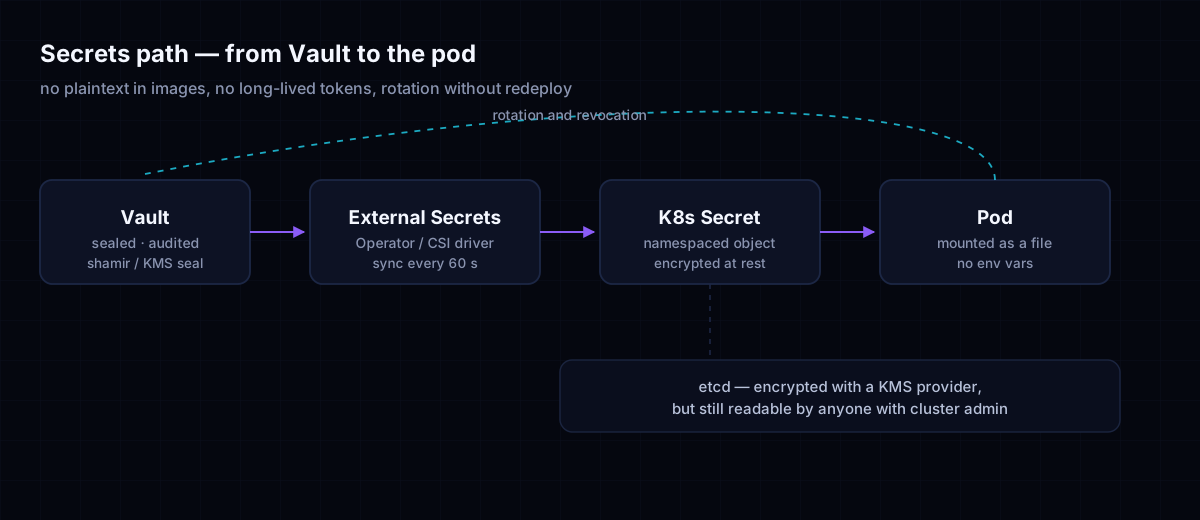
Secret in the namespace, and the pod consumes it. The box at the bottom is the part I make sure to mention in every review — the Secret is still stored in etcd, so etcd encryption remains relevant and get secrets permission still exposes it. The operator does not remove the problem; it shortens the secret’s lifetime and moves the source of truth away from the cluster.apiVersion: external-secrets.io/v1beta1
kind: ExternalSecret
metadata:
name: payments-db
namespace: payments
spec:
refreshInterval: 1h
secretStoreRef:
name: vault-payments
kind: SecretStore
target:
name: payments-db
creationPolicy: Owner
data:
- secretKey: password
remoteRef:
key: payments/db
property: password
refreshInterval: 1h is not a technical detail but a decision. It determines how long a secret that has already been rotated in Vault keeps living in its old version in the cluster. An hour is a reasonable compromise between load on Vault and the exposure window; if the secret rotates every quarter of an hour, there is no point syncing once a day. After the sync runs the Secret is updated, but the pod is not — I expand on that in the chapter on rotation.
What happens when the sync fails
This is the scenario that separates a demo from production. When the operator cannot reach Vault, the Secret is not deleted; it stays with the last value received, and that is usually what you want. The problem is the silence: the ExternalSecret object reports an unhealthy state in status.conditions, and if there is no alert on that state, the system carries on working with a password whose source no longer exists. I recommend alerting on the object’s own state rather than on errors in the log, and checking the SecretStore as well: a failure to authenticate against Vault looks exactly like a secret that does not exist.
The great advantage of this pattern is not security but control. Rotation happens in Vault, with an audit trail and the ability to roll back; deleting the Secret in the cluster is a boring event that the operator fixes; and a compromised namespace exposes only what that namespace’s SecretStore is allowed to read. These are the things I look for when I review an architecture — not the number of supported providers.
Vault: Agent Injector versus CSI
The two familiar models of Vault in Kubernetes give the same external effect — a secret that is not stored in the cluster as a pre-set field — but they behave completely differently when something breaks. The choice between them is not a matter of taste, but of who holds the secret at the moment it is in use.
Agent Injector
The Injector is a webhook that mutates the pod before it is created: it adds an init container and a sidecar container that run vault-agent, authenticate to Vault with the service account token of the pod itself, and write the secret to an emptyDir volume mapped to memory. The application reads a file from /vault/secrets and knows nothing about Vault at all.
metadata:
  annotations:
    vault.hashicorp.com/agent-inject: "true"
    vault.hashicorp.com/role: "payments"
    vault.hashicorp.com/agent-inject-secret-db.env: "secret/data/payments/db"
    vault.hashicorp.com/agent-inject-template-db.env: |
      {{- with secret "secret/data/payments/db" -}}
      DB_PASSWORD={{ .Data.data.password }}
      {{- end }}
The advantage: no node permissions are needed, the sidecar lives inside the pod and holds only the pod’s token, and it also handles renewal and rotation. The drawback: every such pod pays in memory, in start-up time and in an extra container to keep an eye on, and that container has to understand how the application reads the file.
Vault CSI Provider
The second model works through secrets-store.csi.k8s.io and the SecretProviderClass object. Instead of a webhook, the kubelet mounts a tmpfs volume into the pod, and the CSI driver — running as a DaemonSet on every node — brings the content from Vault according to the configuration. The application reads an ordinary file, and the driver refreshes it according to pollInterval. You can also sync to a regular Secret with secretObjects, but then you are back to the problem we started from.
apiVersion: secrets-store.csi.x-k8s.io/v1
kind: SecretProviderClass
metadata:
  name: payments-vault
  namespace: payments
spec:
  provider: vault
  parameters:
    vaultAddress: "https://vault.sanpu17.internal:8200"
    roleName: "payments"
    objects: |
      - objectName: "password"
        secretPath: "secret/data/payments/db"
        secretKey: "password"
| Aspect | Agent Injector | Vault CSI Provider |
|---|---|---|
| Delivery method | A sidecar or init container writing to a file in emptyDir | The kubelet mounts tmpfs through the CSI driver |
| Rotation at runtime | The agent detects a change and runs the reload command you configured | The driver refreshes according to pollInterval and the application re-reads |
| Restart on rotation | Not required, if the application reads the file on every request | Not required, with exactly the same caveat |
| Attack surface | A container inside the pod, with the pod’s token | A DaemonSet on the node, with node permissions |
| Operational complexity | A webhook, an extra container per pod, memory and slower start-up | A CSIDriver, a DaemonSet per node, one object per workload |
| Environment variables | Possible through a template, but a file is better | Not supported directly; only through secretObjects |
| Who sees the secret | The process in the pod | The process in the pod and the kubelet on the node |
The row that interests me most in the table is the one on attack surface. A compromise of the CSI DaemonSet exposes every workload running on that node, because the driver reads on the kubelet’s request rather than on the identity of a particular application. With the Injector, a compromise of the sidecar exposes only that pod’s secret, but that is extra code running alongside the application with access to the secret file. There is no winner here — there is a choice between centralisation and sprawl.
Another point that only surfaces in production: the Injector authenticates to Vault with a service account token, so automountServiceAccountToken: false on that pod breaks the authentication. The fix is not to revert the default but to mount a projected token with an audience matching the role configuration in Vault — that is, exactly the configuration I recommended in the chapter on permissions.
Sealed Secrets and SOPS
In GitOps the manifests live in Git, and that creates a structural problem: a Secret cannot sit there. The two familiar solutions represent two different patterns. Sealed Secrets encrypts the secret before it enters Git and leaves the cluster with the ability to decrypt. SOPS encrypts values inside a YAML file and leaves the ability to decrypt with whoever holds the key.
Sealed Secrets
kubeseal encrypts the Secret with the public key of the controller running in the cluster, and the result is a SealedSecret object that can be kept in Git without worry: without the private key it cannot be decrypted. The controller decrypts it and creates the Secret. The encryption is bound to the namespace and the name, so a stolen SealedSecret cannot be revived in another namespace. That protects against duplication, not against reading.
The drawback: the private key is stored as a Secret in the cluster, in the controller’s namespace. Anyone who reads it can decrypt every SealedSecret in the cluster, so backing it up is both an operational duty and a risk. Rotating the key requires re-encrypting everything that was stored, and that is a project, not a task.
SOPS
SOPS works differently: it encrypts values inside the YAML and leaves the keys readable, so git diff still tells you what changed. Encryption is done with age, with a KMS key or with PGP, and decryption happens outside the cluster — in Argo CD with a plugin, or in Flux with built-in decryption. That means the key sits in CI/CD, so the CI becomes part of the trust boundary: whoever can run a pipeline can decrypt every file it reads.
What the two do not protect against, which is why I repeat it in every review:
- The controller’s private key, or the
agekey in CI — whoever obtains it decrypts everything, in one go. - Anyone with read permission on the
Secretthat was created — the encryption protects Git, not the cluster. - Git history: a value that was rotated stays in earlier versions, so a leaked secret must be replaced, not just "re-encrypted".
- Side processes in CI:
sops exec-envputs the secret into the process’s environment variables, and from there it reaches logs and tests.
An encrypted secret in a file is a secret that only the key holder can read, but it is still present in every clone, every fork and every backup of the repository. If the key is kept in the same place as the file, there is no protection here — only the feeling of protection.
Permissions: who can read what
If there is one sentence I repeat to teams, it is this: a secret is a resource like any other as far as RBAC is concerned. It has no special protection, no separate built-in permission, and the only model that protects it is who can read it. That is why every discussion about secrets starts with who can read, and not with how to encrypt.
Three traps recur in every review of mine. The first: list permission on secrets, which returns every object in the namespace even when their names are unknown. The second: resourceNames, which restricts names on get and update only, not on list and watch — a restriction that looks precise and does not hold. The third: the built-in ClusterRole edit, which grants full permission on secrets in the namespace; anyone given edit to push a deployment can read every secret in that namespace. view has no such permission, and that is a difference worth knowing.
Beyond RBAC, the pod’s own identity is an attack surface. By default the kubelet mounts a service account token into every pod, and that token is enough to identify the pod to the API server and to Vault. If the application does not talk to the API, there is no reason for the token to be there: automountServiceAccountToken: false on the ServiceAccount and on the pod closes that vector. When the token is needed, prefer a projected token with a dedicated audience and a short expirationSeconds, rather than the old kubernetes.io/service-account-token Secret that never expires.
SPIFFE and SPIRE
When identity has to work across clusters or across clouds, one cluster’s service account token is too narrow a base. SPIFFE defines identity as a URI — for example spiffe://sanpu17.internal/ns/payments/sa/payments-api — and SPIRE issues every workload a short-lived certificate (X.509-SVID) that can be presented to Vault, to a service mesh and to external services. The advantage is not only cryptographic: the identity does not depend on the API server of a particular cluster, and it can be verified where the service actually runs. That is also what makes the Zero Trust model practical, as I set out in the Zero Trust guide.
| Control | What it prevents |
|---|---|
Role and RoleBinding scoped to the namespace, without list on secrets | A bulk read of every secret in the namespace in one call |
| A separation between the push role and the runtime read role | A developer looking in kubectl and seeing production passwords |
automountServiceAccountToken: false | Use of the pod’s default token against the API server |
A projected token with an audience and a short lifetime | Reuse of a stolen token that stays valid for weeks |
| SPIFFE/SPIRE identity instead of a cluster token | Identity spoofing across clusters and across environments |
An admission policy that forbids hostPath and privileged | Reading the secrets of the node or of other pods |
etcd encryption with a kms provider | Reading from an etcd backup or an orphaned disk |
Secret rotation and testing
The only test that interests me in a secrets management programme is whether a production password can be replaced without a person touching the cluster and without the service falling over. Everything else — encryption, provider, operator — is infrastructure meant to make that test possible. If the answer is no, every layer above it is theatre.
What happens to a running pod
The answer depends on how the secret reached the process. A secret mounted as a file from a volume is updated by the kubelet: it swaps the ..data symlink atomically, and the process reading the path sees a new value on the next read. A secret injected as an environment variable is never updated — environment variables are fixed when the process is created and do not change afterwards, so a pod that has been running for two weeks is running a password from two weeks ago. That is the one difference that really matters between "the secret was rotated" and "the service is using the new secret".
Between the two there is a dependency on the application. If the code reads the file on every request, that is enough. If it reads once at start-up and keeps the value in memory, it needs a signal — SIGHUP or a dedicated endpoint — in order to reload. If it manages a connection pool, the connections have to be closed and reopened. I recommend defining this as part of the service’s contract, not as a one-off fix for whoever is rotating right now.
How to test rotation in staging
The test I run is a chain, not a screenshot. In the first stage you replace a secret in Vault and verify that the file in the pod is updated within a reasonable time. In the second stage you verify that the application tried to reconnect, and not only read the file. In the third stage you verify that the old secret is rejected by the system that issues it — that is the stage that gets forgotten, and without it the rotation is cosmetic. In the fourth stage you test alerting: what happens when the operator cannot sync, and who gets notified. In the fifth stage you test rollback.
kubectl -n payments exec deploy/payments-api -- \
  cat /vault/secrets/db.env

kubectl -n payments get externalsecret payments-db \
  -o jsonpath='{.status.conditions[?(@.type=="Ready")].status}'
I recommend running the test once a quarter, with a real secret in a staging environment and a short lifetime. Vault’s dynamic secrets — the kind created on demand and expiring after an hour — make the test cheap, because there is nothing to rotate by hand: expiry is the rotation.
The current standard requires a procedure for managing keys and secrets: a defined period of use, replacement at the end of it, and documentation of who accessed what. Requirement 3 covers the protection of stored account data, including key management; Requirement 10 covers logging and monitoring of access. I treat this as an operational requirement, not a purchase: an audit will ask when the last secret was rotated, who was given access and where the record is — and all three are answered by the architecture, not by a statement. The details of the standard are in the PCI SSC document library. For a Singapore entity the same evidence is what the MAS Technology Risk Management Guidelines expect for technology risk and access control, and personal data in the same pipeline carries duties under the PDPA 2012, administered by the PDPC.
An API token from three years ago that still works is the most dangerous secret in an organisation, because it survives staff turnover, copies into .env files and duplication into test environments. A fixed database password falls into the same category. If there is no expiry date and no process that replaces the secret, it has no owner — only whoever happens to hold it.
Checklist
This is the list I actually run, more or less in this order. It does not cover everything, but it covers what I find forgotten. If an item is not relevant in your environment, that does not mean it is unnecessary — it means someone decided otherwise and perhaps never recorded the decision.
- Every
Secretin the cluster is created from an external source of truth, not bykubectl create secretfrom inside the pipeline. - etcd encryption is active with a
kmsv2 provider, andidentityis not the first provider in the list. - No
Rolegrantslistorwatchonsecretsto anyone who is not an operator. automountServiceAccountToken: falsewherever the API is not required.- Service account tokens are limited by
audienceand by lifetime, and are not created as a legacySecret. - Secrets are consumed as files from a volume, not as environment variables.
refreshIntervalis set according to the real rotation rate in Vault, not by default.- There is an alert on the unhealthy state of
ExternalSecretandSecretStore, and not only on errors in the log. - A rotation drill runs in staging once a quarter, including verification that the old secret is rejected.
immutable: trueon secrets that are not supposed to change, so that they are not silently overwritten.
Key takeaways
- base64 is an encoding, not encryption: anyone with read permission in the namespace sees the secret.
- etcd encryption with a
kmsprovider is a necessary minimum, but it does not reduce permissions and does not replace architecture. - External Secrets Operator separates the source of truth from the object in the cluster and shortens the secret’s lifetime.
- The choice between Agent Injector and CSI is mainly a question of attack surface: a container per pod versus a DaemonSet per node.
- Rotation is the real test; without an automated process and without verification that the old secret is rejected, the secret stays forever.
Sources and links
- Kubernetes — Secrets: official documentation of the object, including the explicit explanation that base64 is not encryption.
- Kubernetes — Encrypting Data at Rest: configuring
EncryptionConfiguration,kmsproviders and switching between providers. - External Secrets Operator: documentation of the CRDs,
SecretStore,ExternalSecretand the sync cycle. - HashiCorp Vault — Documentation: authentication models, Vault Agent Injector and Vault CSI Provider.
- SPIFFE: the workload identity specification and SPIRE documentation, including X.509-SVID certificates.
- PCI Security Standards Council — Document Library: the text of PCI DSS 4.0.1 and the key management requirements.
- NIST SP 800-207 — Zero Trust Architecture: the principle behind authorising by workload identity rather than by network location.